> ## Documentation Index
> Fetch the complete documentation index at: https://docs.magicfox.co/llms.txt
> Use this file to discover all available pages before exploring further.
# MainStage advances multiple patches
If you’re using a [foot switch pedal](/articles/pedals-for-mainstage) to change patches, MainStage might skip multiple patches each time you press the pedal—even if everything seems to be set up correctly. This is particularly common with Roland keyboards but occurs with other brands as well.
Most of the time, this issue is caused by your keyboard sending multiple MIDI messages. You can confirm this is happening by choosing `Window > MIDI Message Monitor` to open the monitor.
## Solution 1: Check your keyboard settings
There are two primary types of pedals. **Switch pedals** are binary, only sending on and off messages. Switch pedals are ideal for tasks like toggling an effect or advancing patches. In contrast, **continuous control pedals** send a range of values and are thus suitable for controlling volume or expression. Switch and continuous control pedals are not necessarily interchangeable.
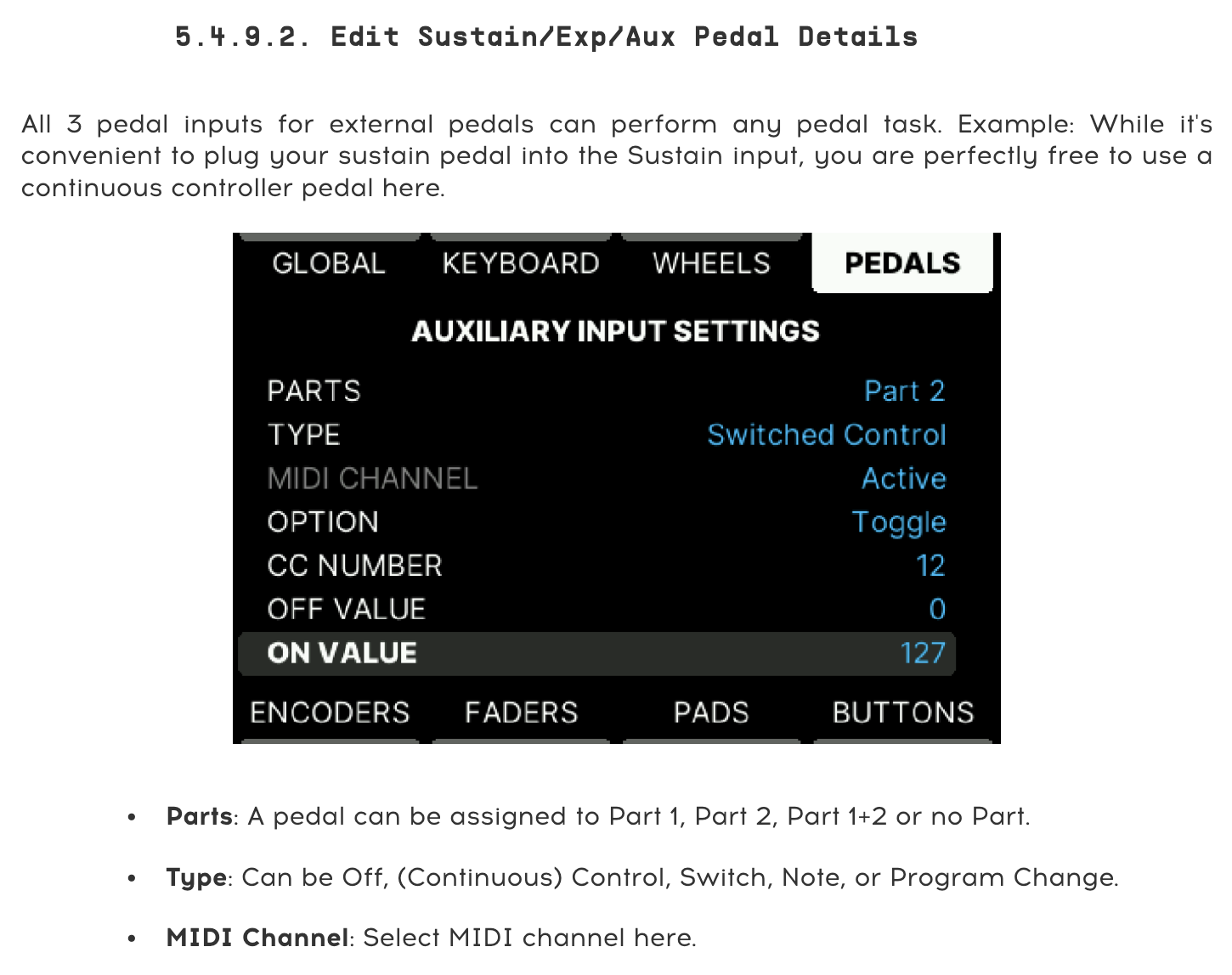
If your keyboard has inputs for multiple pedals, the manufacturer will have determined whether each input is intended for a switch or a continuous control function by default.
Many keyboards provide a setting to change the functionality of each input. If your keyboard provides this setting, refer to your keyboard's user manual for instructions on how to modify this. The input type for a patch change pedal should be set to **switch**.
 ## Solution 2: Switch the pedals
If your keyboard doesn't provide the option to change the pedal input behavior in settings, you can try switching where the pedals are plugged in:
1. Plug the patch change foot switch pedal into **Damper**.
2. Plug the sustain pedal into **FC1**.
Next, you will need to [reassign the sustain and next patch screen controls](/basics/assigning-screen-controls) in [Layout mode](/basics/mainstage-modes):
3. Assign the next patch screen control to your patch change pedal.
4. Assign the sustain pedal screen control to your sustain pedal.
The screen controls in our keyboard programming are already mapped to the correct functions, so everything should now work correctly.
### Screen control mapping
Screen control mapping should not be confused with [note mapping](/articles/what-is-mapping).
If you're using programming from another source, you may need to additionally map the screen controls in [Edit mode](/basics/mainstage-modes):
1. Choose `File > Concert Settings` to select the concert item in the patch list.
2. Click the sustain pedal screen control to select it.
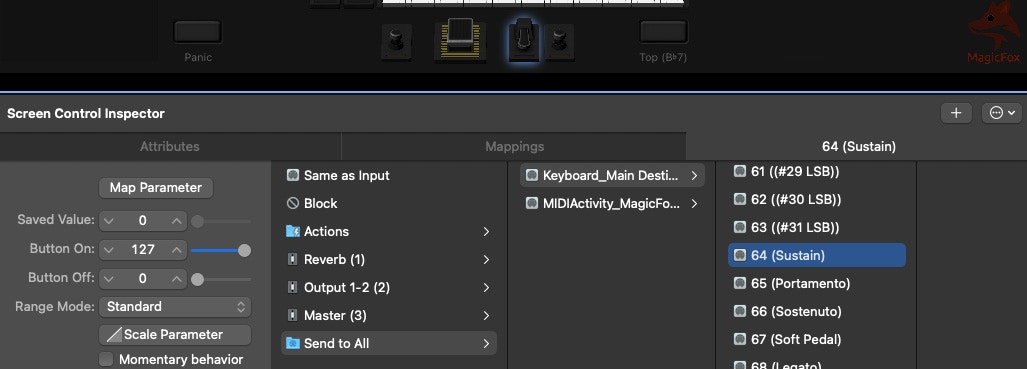
3. In the Screen Control Inspector at the bottom, set the pedal's mapping to **Send to All > \[Keyboard Screen Control] Destinations > 64 (Sustain)**.
## Solution 2: Switch the pedals
If your keyboard doesn't provide the option to change the pedal input behavior in settings, you can try switching where the pedals are plugged in:
1. Plug the patch change foot switch pedal into **Damper**.
2. Plug the sustain pedal into **FC1**.
Next, you will need to [reassign the sustain and next patch screen controls](/basics/assigning-screen-controls) in [Layout mode](/basics/mainstage-modes):
3. Assign the next patch screen control to your patch change pedal.
4. Assign the sustain pedal screen control to your sustain pedal.
The screen controls in our keyboard programming are already mapped to the correct functions, so everything should now work correctly.
### Screen control mapping
Screen control mapping should not be confused with [note mapping](/articles/what-is-mapping).
If you're using programming from another source, you may need to additionally map the screen controls in [Edit mode](/basics/mainstage-modes):
1. Choose `File > Concert Settings` to select the concert item in the patch list.
2. Click the sustain pedal screen control to select it.
3. In the Screen Control Inspector at the bottom, set the pedal's mapping to **Send to All > \[Keyboard Screen Control] Destinations > 64 (Sustain)**.
 5. Click the patch change foot switch screen control to select it.
6. Set the pedal's mapping to **Actions > Next Patch**.
## Read more
* [Choosing a keyboard to use with MainStage](/articles/choosing-a-keyboard)
* [What pedals do I need for MainStage?](/articles/pedals-for-mainstage)
* [How do I change patches in MainStage?](/basics/changing-patches)
5. Click the patch change foot switch screen control to select it.
6. Set the pedal's mapping to **Actions > Next Patch**.
## Read more
* [Choosing a keyboard to use with MainStage](/articles/choosing-a-keyboard)
* [What pedals do I need for MainStage?](/articles/pedals-for-mainstage)
* [How do I change patches in MainStage?](/basics/changing-patches)