> ## Documentation Index
> Fetch the complete documentation index at: https://docs.magicfox.co/llms.txt
> Use this file to discover all available pages before exploring further.
# Harp Gliss Trigger Script
The [Harp Gliss Trigger script](https://magicfox.co/pages/mainstage-scripts) creates a realistic harp glissando that can be triggered a single note. The Harp Gliss Trigger script can also be used in Logic Pro. [Click here for instructions](/articles/scripter/scripter-main) on how to install this script in MainStage.
We also have a [Harp Pedals script](/articles/scripter/harp-pedals) if you'd like to play glisses manually instead.
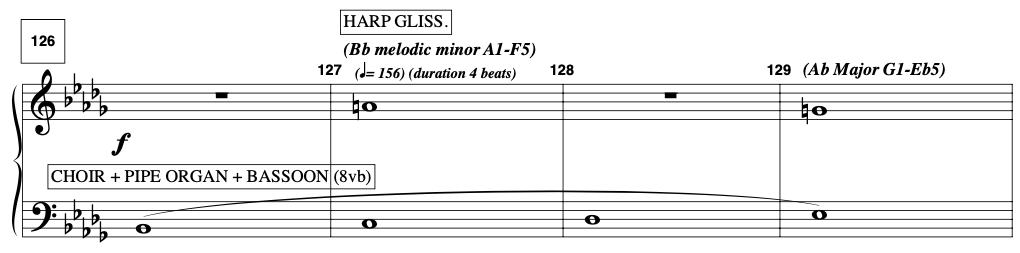
Here's an example from a keyboard part in [The Addams Family](https://magicfox.co/products/the-addams-family) showing triggered harp glisses in measures 127 and 129. The Harp Gliss Trigger script allows you to add and modify these harp triggers easily.
 If you're using MainStage's default harp instrument, consider increasing the [Sampler](https://support.apple.com/guide/mainstage/sampler-overview-lgsifc860d24/mac) polyphony to 64. Click the "Details" button in the "Synth" pane.
## Parameters
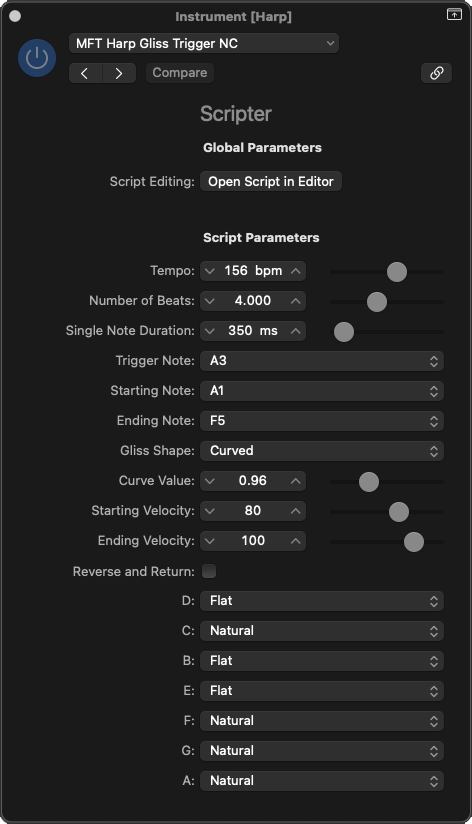
`Tempo` The tempo of the glissando.
`Number of Beats` The number of beats the glissando should fill. The final note of the glissando plays on the *following* beat.
`Single Note Duration` The length of each individual note in milliseconds.
`Trigger Note` The note that triggers the glissando.
`Starting Note`, `Ending Note` The range of the glissando. If you choose a higher pitch for the ending note, the script will play an ascending gliss, and vice versa.
`Gliss Shape` Changes the timing of when each note is played in the glissando. If you choose “Linear / Even”, each note will be played rhythmically equidistant.
`Curve Value` Only applicable if “Gliss Shape” is set to “Curved”. If this value is less than 1.00, the gliss will start slowly and accelerate. If this value is greater than 1.00, the gliss will start quickly and decelerate. The closer this value is to 1.00, the more rhythmically even the notes of the gliss are played.
`Starting Velocity`, `Ending Velocity` The velocity at the beginning and end of the glissando.
`Reverse and Return` When enabled, the script will actually play two glissandi. The second gliss reverses direction and returns to the “Starting Note”.
This practically doubles the number of total notes, so you may need to adjust the `Tempo` and/or `Number of Beats` values accordingly!
`(Harp Pedals)` Changes the harp pedal settings for each natural note.
If you're using MainStage's default harp instrument, consider increasing the [Sampler](https://support.apple.com/guide/mainstage/sampler-overview-lgsifc860d24/mac) polyphony to 64. Click the "Details" button in the "Synth" pane.
## Parameters
`Tempo` The tempo of the glissando.
`Number of Beats` The number of beats the glissando should fill. The final note of the glissando plays on the *following* beat.
`Single Note Duration` The length of each individual note in milliseconds.
`Trigger Note` The note that triggers the glissando.
`Starting Note`, `Ending Note` The range of the glissando. If you choose a higher pitch for the ending note, the script will play an ascending gliss, and vice versa.
`Gliss Shape` Changes the timing of when each note is played in the glissando. If you choose “Linear / Even”, each note will be played rhythmically equidistant.
`Curve Value` Only applicable if “Gliss Shape” is set to “Curved”. If this value is less than 1.00, the gliss will start slowly and accelerate. If this value is greater than 1.00, the gliss will start quickly and decelerate. The closer this value is to 1.00, the more rhythmically even the notes of the gliss are played.
`Starting Velocity`, `Ending Velocity` The velocity at the beginning and end of the glissando.
`Reverse and Return` When enabled, the script will actually play two glissandi. The second gliss reverses direction and returns to the “Starting Note”.
This practically doubles the number of total notes, so you may need to adjust the `Tempo` and/or `Number of Beats` values accordingly!
`(Harp Pedals)` Changes the harp pedal settings for each natural note.